
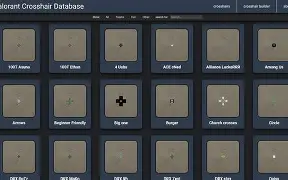
In Valorant, understanding your crosshair settings might be the key that opens up the path to win the critical duels, consistently shoot headshots, and level up your ranks rapidly. Among the hands-on methods for setting your aim perfectly is the use of Valorant crosshair codes – these are predefined reticle styles that you can directly import into the game with a single click. This detailed guide discusses what crosshair codes are, how to leverage them, lists the hottest codes in 2026, and also includes pro tricks to get your gear ready for a competitive match.
What Are Valorant Crosshair Codes?
In essence, a Valorant crosshair code acts like a container for all the settings of your crosshair — from the colour, size, line thickness, opacity to the extra features. So, rather than tweaking the sliders individually, with the help of a code, you can apply a whole crosshair setup to your profile instantly.
Crosshair codes have gained immense popularity for the following reasons:
- First and foremost they allow players to imitate the setups used by pros.
- Secondly, this shortcut option takes less time than manual fine-tuning.
- Lastly, users can send these to their buddies or share on social media accounts.
How to Import a Valorant Crosshair Code
It’s as straightforward as ABC if you want to use a crosshair code:
- Launch Valorant and head over to Settings.
- Select the Crosshair sub-menu.
- Hit Import Profile.
- Enter the crosshair code you wish to use.
- Rename your freshly imported crosshair and save the changes.
You no longer need to adjust each setting one at a time – this will refresh your crosshair setup immediately.
Why Crosshair Settings Matter in Valorant
Valorant is a tactical shooter game based on precision where every fraction of the second and pixel matters. Your crosshair is the centre of your shooting – even minor changes could have the effect of:
- Increasing headshot precision
- Quickly following the target
- Being easily visible on different maps
- Having more courage to take gunfights
It could restrict the use of your skills if you are stuck with a poor or visually distracting crosshair, especially when there is fast-moving opponents or when the light conditions vary from one map to another.
Best Valorant Crosshair Codes in 2026
Below are some of the most popular and effective crosshair codes you can copy and test in 2026 — from pro players and meta-tested setups:
Precision Headshot Focused (Minimal)
Ideal for players who prefer clean visuals and pinpoint headshots.
0;P;c;5;o;1;0l;2;0a;1;0f;0;1t;1;1l;0;1o;8;1a;0.172
Best for mid-range duels and players who rely on tapping and flicking.
Balanced All-Rounder
A versatile crosshair that works well across agents and maps:
0;P;c;1;o;1;0l;3;0o;5;0a;1;0f;0;1b;0
Good choice for beginners or intermediate players.
High-Visibility Meta Crosshair
Great for visibility in dark or bright maps thanks to bold lines and contrast.
0;P;c;3;o;1;0l;3;0o;7;0a;1;0f;0;1b;0
If you struggle to spot your reticle in combat, this setup helps.
Popular Crosshair Codes From Pro Players
Pro players often share their exact crosshair codes so fans can mimic their competitive settings. Some standout examples used by elite players include:
- TenZ’s Crosshair Code – A well-balanced setup with clean lines and Cyan colour, ideal for precise aim.
- ScreaM’s Headshot-Focused Dot – Small and minimal for pinpoint accuracy.
- aspas’ Classic White Crosshair – A simple but effective design used in competitive circuits.
- Shroud-Style Precision Reticle – Favoured by players who focus on long-range accuracy.
Copying a pro’s crosshair can give valuable insight into how top players design their aiming environment, but adjust based on your personal comfort.
Choosing the Right Crosshair Color
Color dramatically impacts how easily you can see your crosshair against different map backgrounds. Some popular choices include:
| Color | Hex Code | Visibility |
| White | #FFFFFF | High |
| Neon Green | #00FF00 | High |
| Light Blue | #00B5FF | Medium |
| Cyan | #00FFFF | Medium |
| Red | #FF0000 | Depends on map |
Bright colors like green or neon boost visibility across most situations, while darker or subtle colors might blend in but look cleaner. Experiment with different hues in practice mode to find what works best for you.
Pro Tips for Crosshair Optimization
Here are some tips you can apply right away to make your crosshair setup even better:
Test Multiple Codes
Don’t just choose the first code you find. Run them through the practice range to figure out which one feels right.
Adjust For Map Visibility
A crosshair that looks perfect on one map could be barely visible on another. Thinking about making different profiles for each map type.
Consider Playstyle
Players with an aggressive style might be better off with bigger crosshairs to be more aware of surroundings, while precision players may lean towards tiny dot reticles.
Keep It Clean
Try not to use very thick or complicated styles; these might confuse you instead of helping.
Conclusion
Valorant crosshair codes are tactical tools that a serious player can’t do without.
Importing and experimenting with crosshair codes will polish your aiming skills and solidify the confidence you need in fights, regardless of whether you are aiming for flawless headshots, striving for the level of the best, or just trying to see your enemies clearer.
Pick the professional crosshair codes from this article, modify them as you wish, and be brave to experiment. The crosshair with which you achieve the best results under pressure and feel most comfortable is your ideal crosshair.
Do you want to deliver headshots like a pro? Give these crosshair setups a shot and watch your gameplay get better!
Also Read: Gold and Silver Extend Gains to Fresh Record Highs, Bitget Data Shows
