
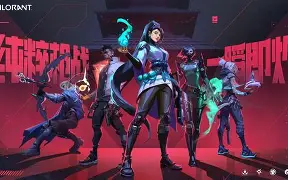
Valorant players continuously look for an ideal gaming setup that can enhance their precision, speed of reaction, and gaming skills in general. Among the crucial settings that can impact one’s ability to shoot is the crosshair. A neat and comfortable crosshair aids players to focus on their enemies and at the same time, have good crosshair placement. The newest Valorant crosshair codes for June 16 provide a range of pro, beginner-friendly and creative crosshair settings that can be easily imported and experimented by players.
These Valorant crosshair codes will let you personalize your experience whether you are into the small dot crosshair, the classic static design or the ones used by pros. Many top-level players rely on very simple crosshairs because they limit distractions and make it easier to spot the enemies during heated battles.
Latest Valorant Crosshair Codes June 16
Crosshair personalization has turned into a key aspect of the Valorant community. Riot Games rolled out crosshair sharing codes which enable players to easily duplicate and import settings across accounts. This greatly facilitates the testing of various looks without the need for changing each feature manually.
Here are some trending Valorant crosshair codes waiting for you to test out:
Pro Player Inspired Crosshair Codes
TenZ Style Crosshair
Code:
0;s;1;P;c;5;h;0;m;1;0l;4;0o;2;0a;1;0f;0;1b;0;S;c;4;o;1
This type of crosshair focuses on visibility and precision. It uses a compact design that many players prefer for fast headshots and accurate tapping.
Shroud Style Crosshair
Code:
0;P;o;0.506;d;1;z;1;0t;1;0l;4;0o;2;0a;1;0f;0;1b;0
The Shroud-inspired setup provides a balanced look with clear center placement, making it useful for both ranked matches and casual games.
Small Dot Crosshair Code
A dot crosshair is popular among players who want minimal screen distraction.
Code:
0;s;1;P;c;1;h;0;d;1;z;1;f;0;0b;0
This style is preferred by players who rely on precise single-shot weapons like the Vandal (Valorant weapon) and Phantom (Valorant weapon).
Best Valorant Crosshair Settings for Competitive Players
Ultimately, the perfect crosshair for you hinges on your playstyle. Just because a professional player has their specific settings, that doesn’t necessarily mean your performance would instantly skyrocket from using them after all, comfort and muscle memory are major factors. Despite that, trying out popular Valorant crosshair settings is one of the ways players can uncover a design that suits their style of aiming.
The most critical features of crosshair are:
- Crosshair color: Go for a color which is easily distinguishable from the environment on the map.
- Center dot: If you are the type of player who likes precise aiming, then this is a helpful feature.
- Outline settings: This aids the visibility during the fights.
- Movement error: Disabling this is the choice of most competitive players.
- Firing error: Some players prefer turning it off to have a cleaner view.
One of the reasons why many top-tier players choose static crosshairs is that they provide the same visual reference even while moving and shooting.
Best Valorant Crosshair Codes for Headshots
Since headshots often determine the outcome of gunfights in Valorant, that is why people frequently look for the best crosshair for landing headshots. In general, a good headshot crosshair should be small, clearly visible, and not cover the head of an opponent.
Some of the most popular options are:
Classic Headshot Crosshair
Code:
0;P;c;5;h;0;0l;4;0o;2;0a;1;0f;0;1b;0
Such a crosshair keeps the center easy to track while still allowing the necessary space around the target.
Minimal Competitive Crosshair
Code:
0;P;c;1;h;0;0l;3;0o;2;0a;1;0f;0;1b;0
For the players who prefer to keep their crosshair clean yet competitive looking, this is the one to go for.
Funny and Creative Valorant Crosshair Codes
It is not necessary to have a serious esports-style crosshair if you are just one of the many players having fun. In fact, some players go quite a distance with unique designs in doing so. Shapes and themed crosshairs are just a couple of examples. Really creative community-made crosshairs include such styles that can alter the usual Valorant gameplay experience.
Some of the popular creative categories are:
- Heart crosshair
- Circle crosshair
- Box crosshair
- Troll crosshair
- Meme-style crosshair
While they are definitely not the best picks for ranked matches, these designs can certainly liven up custom games.
How to Import Valorant Crosshair Codes
Using a Valorant crosshair code is simple. Follow these steps:
- Open Valorant.
- Go to Settings.
- Select the Crosshair section.
- Choose the Import Profile Code option.
- Paste the crosshair code.
- Confirm and save the new profile.
After importing, test the crosshair in the practice range before using it in competitive matches.
How to Find Your Perfect Valorant Crosshair
The best crosshair is different for every player. Instead of copying a professional player’s setup permanently, try multiple options and adjust them according to your preference.
Consider these factors:
- Your monitor resolution
- Your sensitivity settings
- Your preferred weapons
- Your aiming habits
- Map visibility
A smaller crosshair works well for precise players, while slightly larger designs may help beginners maintain focus.
Conclusion
The latest Valorant crosshair codes give players many options to improve their visual comfort and aiming experience. From professional player-inspired settings to simple dot crosshairs and creative designs, every player can find a setup that matches their style.
A crosshair alone will not guarantee better results, but the right settings can improve confidence, target tracking, and consistency. Test different Valorant crosshair settings, practice regularly, and choose the one that feels natural for your gameplay.
Also Read: Jack Mallers Says Bitcoin Is Pricing a Global Liquidity Crisis as Stocks Ignore Economic Weakness
